How to Use Wabisabi
Your guide to authentic, real-time social connection
Wabisabi is built around one simple rule: only what's real, and only in the moment. This guide will help you navigate the app and make the most of its unique features.
Getting Started
Capture Live
Every piece of content must be captured in real-time through your camera or microphone. No uploads, no filters, no edits.
Audio-First
Wabisabi emphasizes thoughtful voice communication. Add audio captions to photos and videos, or create standalone audio posts.
Multitask Freely
Lock your audio queue and keep listening as you browse, or even while your phone is locked—perfect for on-the-go.
Main Screens
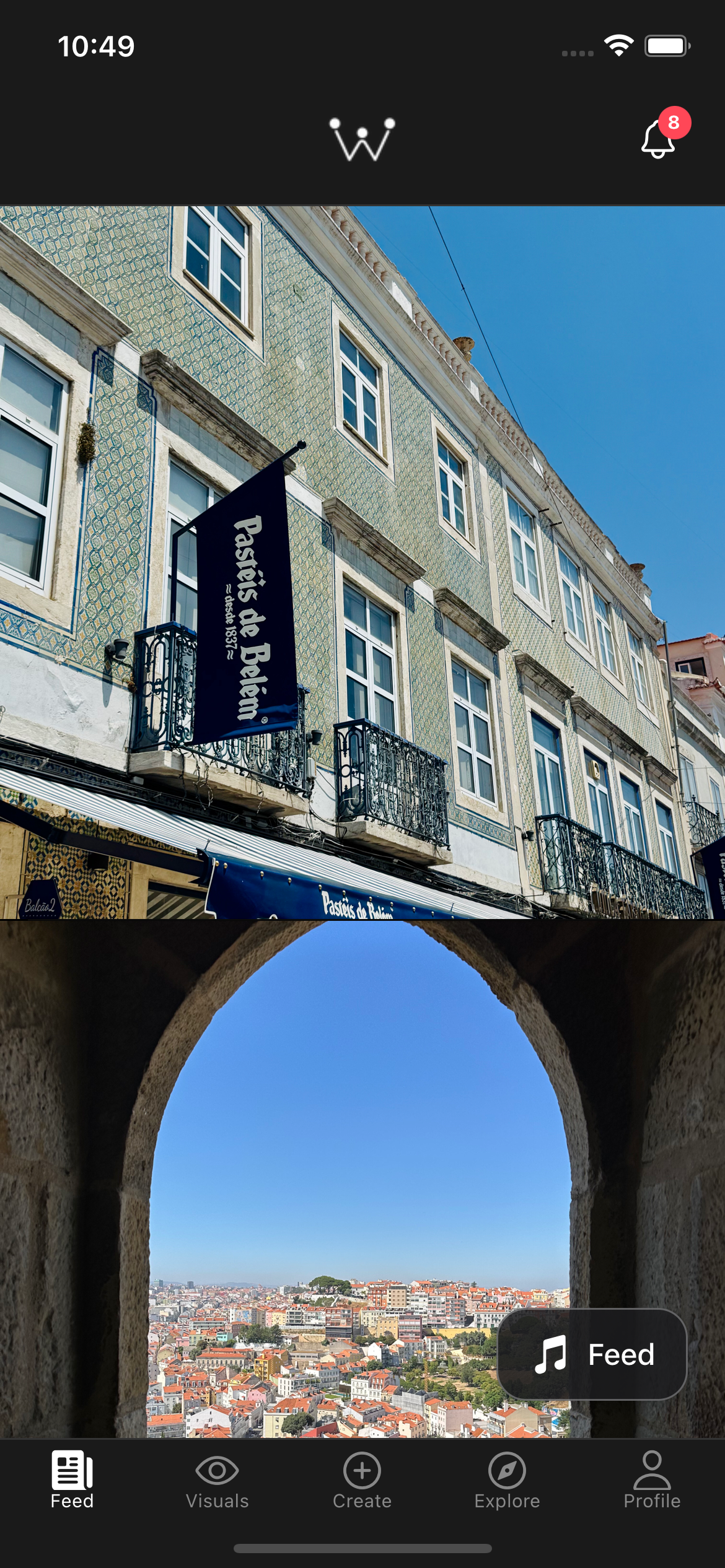
Feed Screen
Your Feed shows posts from people you follow in reverse chronological order (most recent first). While you scroll through images and auto-playing videos, the Social Podcast plays unrelated audio posts from your followed users in the background.
Key Features:
- No engagement metrics visible: Like and comment counts are hidden on the feed to reduce performance pressure
- Double-tap to like: Quick interaction without distraction
- Single tap to view details: Opens the Post Detail screen with full audio and comments
- Social Podcast integration: Tap transcription text in the Social Podcast to jump to that post's detail screen
- Suggested users: Periodically see suggestions for accounts to follow
Explore Screen
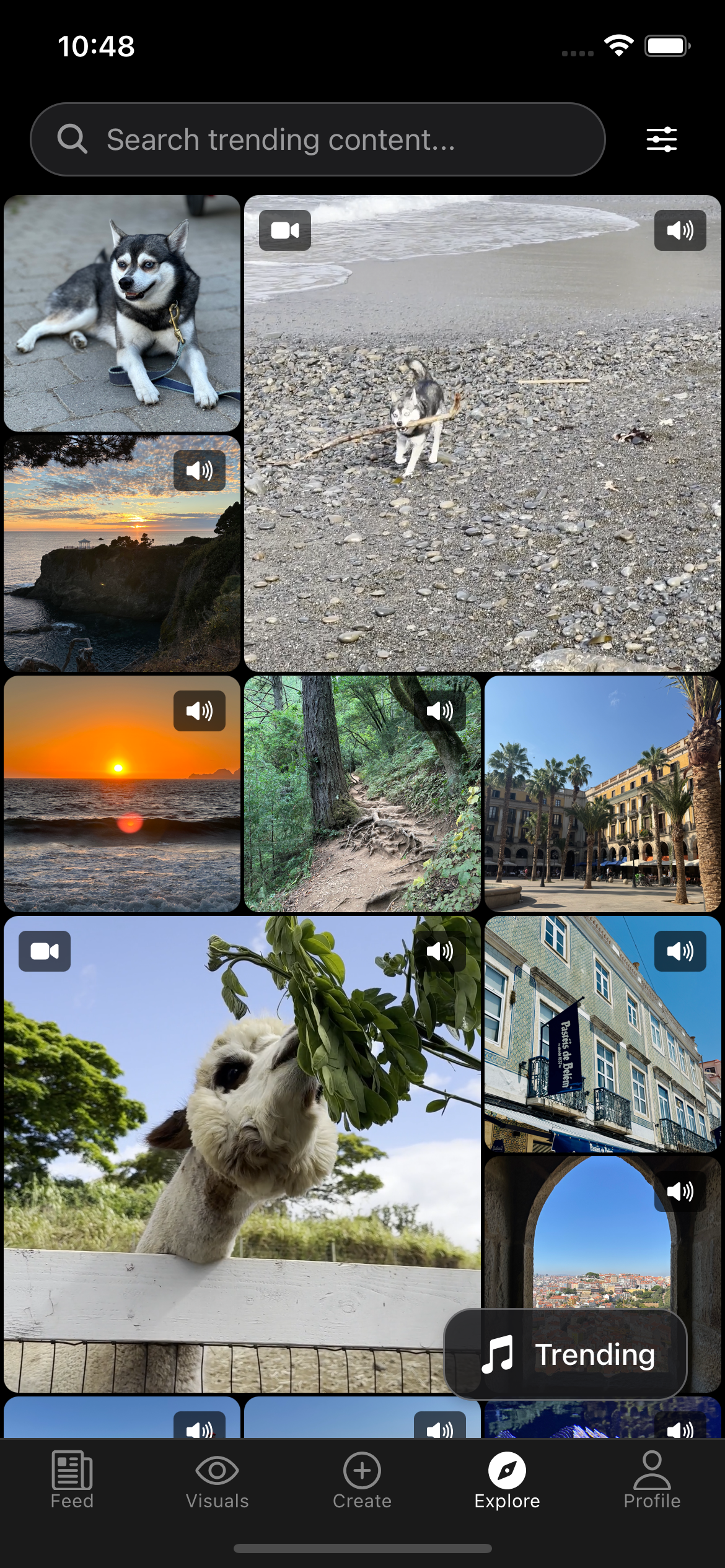
Discover trending content from across the platform. The Explore screen combines visual browsing with trending audio posts playing in the background—like scrolling through Instagram while listening to Twitter's top posts.
Key Features:
- Search functionality: Find specific users or topics
- Trending grid: Browse popular photos and videos
- Audio discovery: The Social Podcast automatically plays trending audio posts
- Single tap to explore: Tap any post to see its details and comments
Clips Screen
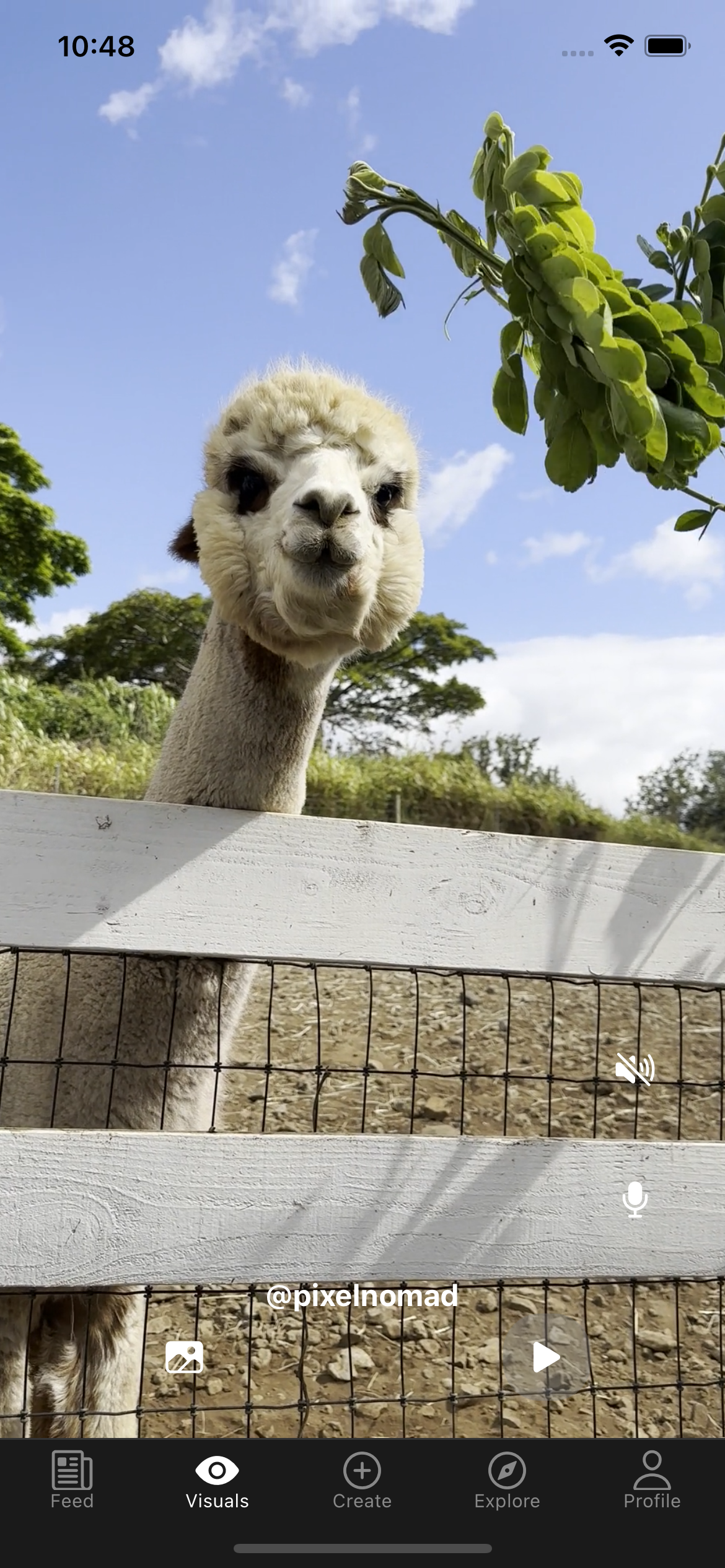
Full-screen vertical video experience, similar to Instagram Reels or TikTok. Scroll through videos with no distractions—no visible engagement metrics until you tap into the post.
Key Features:
- Immersive viewing: Full-screen video with clean interface
- Auto-play: Videos play automatically as you scroll
- Double-tap to like: Quick engagement without leaving the experience
- Tap for details: Single tap opens Post Detail with audio comments and captions
- Algorithm-driven: Content the algorithm thinks you'll like
Shots Screen
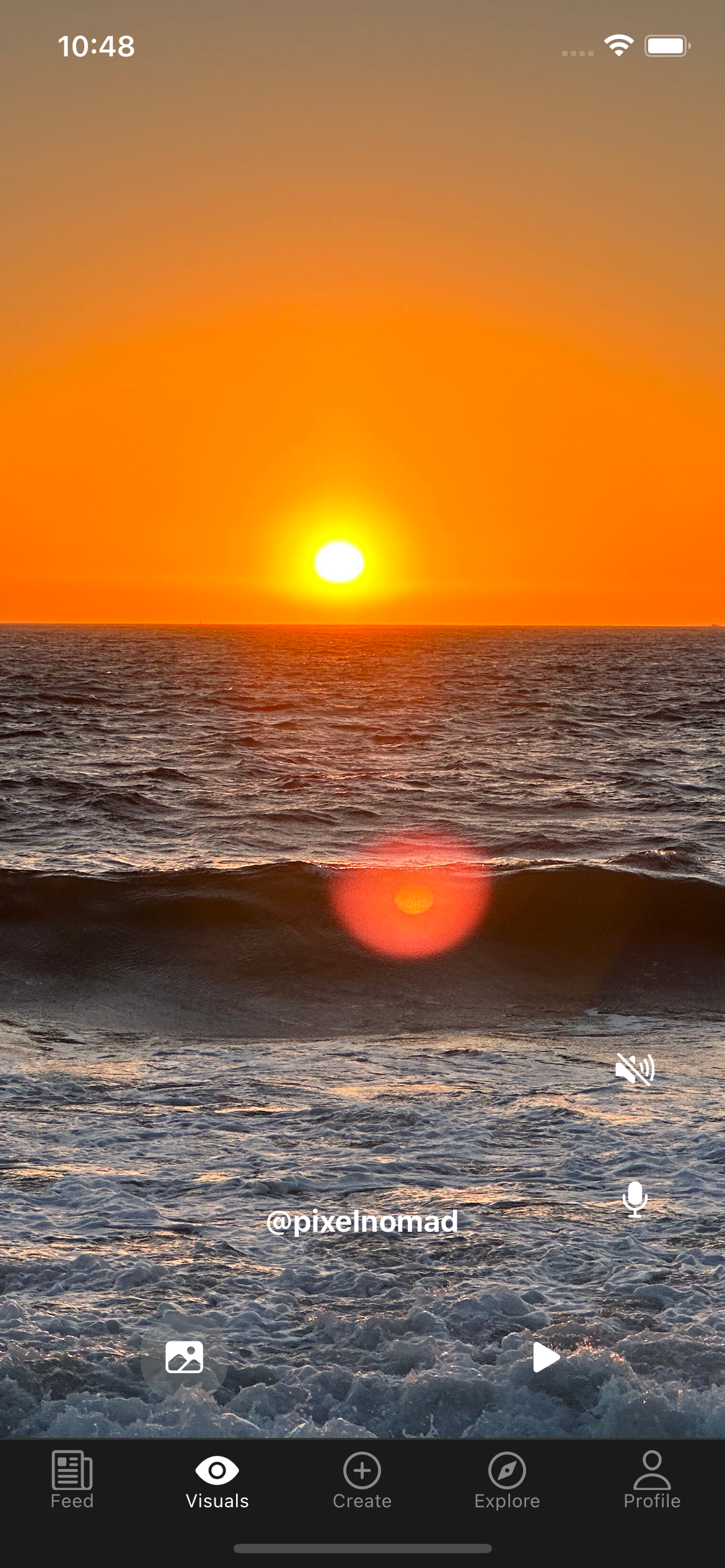
Full-screen vertical photo experience, just like Clips but for photos. Scroll through beautiful images with the same immersive, distraction-free interface—no visible engagement metrics until you tap into the post.
Key Features:
- Immersive viewing: Full-screen photos with clean interface
- Double-tap to like: Quick engagement without leaving the experience
- Tap for details: Single tap opens Post Detail with audio captions and comments
- Audio captions: Photos with audio captions will automatically launch the Social Podcast
- Algorithm-driven: Content the algorithm thinks you'll like
Profile Screen
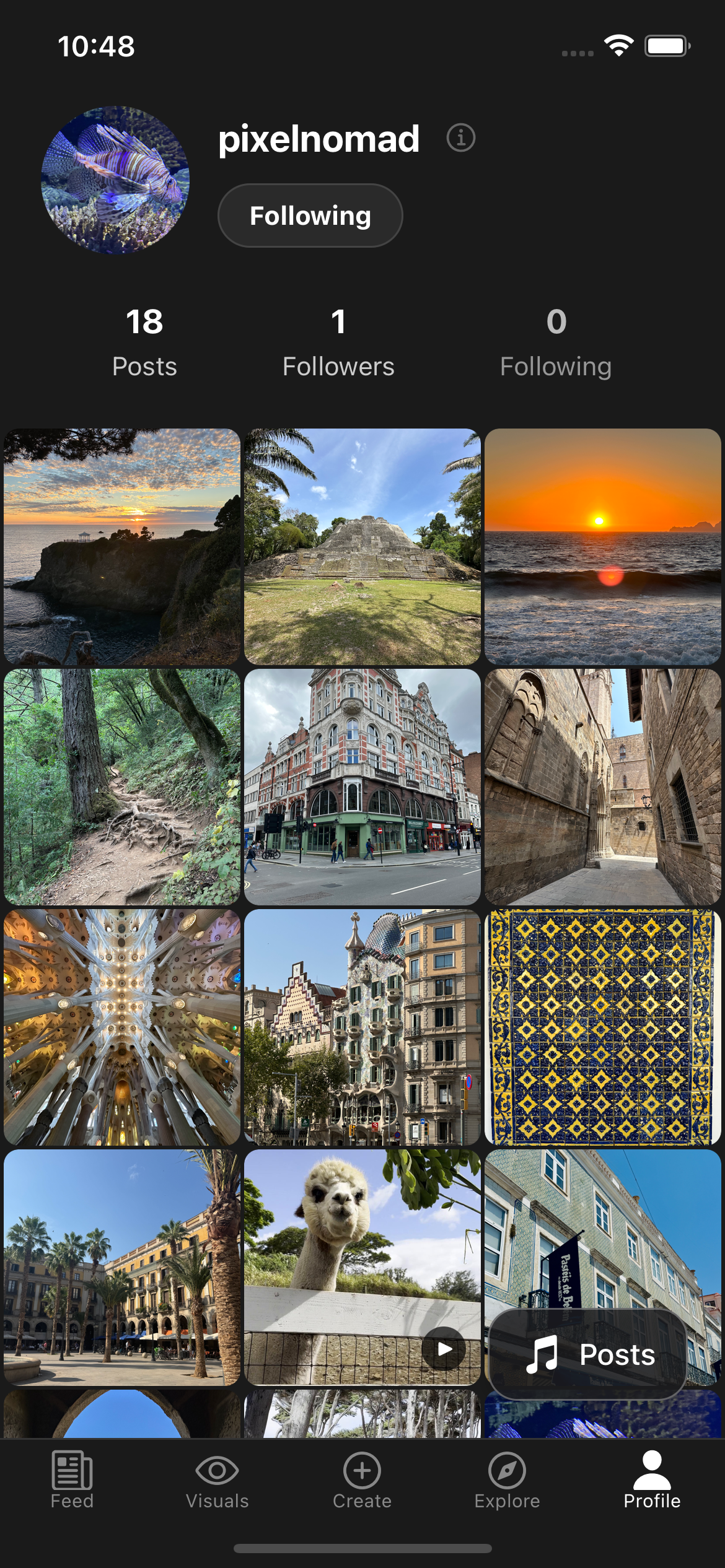
View any user's profile with their post grid. When you visit a profile, the Social Podcast automatically starts with their Audio Bio (a 30-second introduction), followed by their most recent audio posts.
Key Features:
- Audio Bio: Every user can record a 30-second audio introduction
- Post grid: Scroll through photos and videos while listening
- Automatic playback: The Social Podcast launches with bio and posts
- Record your own bio: Long-press the info button (i) on your own profile to record or update your Audio Bio
The Social Podcast
The Social Podcast is Wabisabi's signature feature—a persistent audio player that creates a hierarchical comment structure reminiscent of written forums, but with voice. Think of it as turning your social feed into a personalized podcast.
- Navigate through audio conversations like a comment section
- Lock your queue to keep listening as you go to other tabs
- Deep dive into comment threads with a single tap
- Record comments directly while listening

Launching the Social Podcast
There are three main ways to start the Social Podcast:
Feed Button
Launch from your Feed to hear audio posts from people you follow

Trending Button
Launch from Explore to discover trending conversations

Profile Button
Launch from any Profile to hear their audio bio and posts
Basic Controls
The Social Podcast appears at the bottom of your screen with intuitive controls:
Previous
Go back to the previous item in the queue
Double-tap: Go to the parent of the current item
Long-press: Go to the parent post/caption
Play/Pause
Control audio playback
Next
Skip to the next item in the queue
Double-tap: Jump to the next sibling (skip nested replies, move one level up)
Long-hold: Go to the next full post in the queue (skip all commentary)
Deep Dive
Navigate into comment threads (more below)
Double-tap: Add all items, children, and further branches down the hierarchy
Lock
Fix the current queue while browsing
Like
Like the current post or comment
Record
Record a voice comment (more below)
Close
Close the Social Podcast
Username: Tap to navigate to the user's Profile screen
Transcription: Tap to navigate to the Post Detail screen
Lock Feature: Listen While You Explore
The Lock button is what makes Wabisabi truly unique. Tap it to "lock" your current audio queue, which means the queue won't change as you navigate to different screens.
Use Cases:
- Browse while listening: Lock audio from your Feed, then browse Explore or profiles while continuing to listen
- Multitask: Keep listening as you check other apps or lock your phone
- Focus on audio: Perfect for when you're working out, cooking, or driving (future CarPlay support)
- Save for later: Lock a profile's audio bio and posts to listen through completely
🔓 Unlocked (grey): Queue changes as you navigate
🔒 Locked (green): Queue stays fixed, you're free to explore
Deep Dive: Navigate Comment Threads
The "Deep Dive" button appears when the current audio post or comment has replies. This is Wabisabi's innovative way of navigating hierarchical audio conversations.
How It Works:
Deep Dive lets you explore comment threads in two ways:
Listen to a post with comments
Tap Deep Dive (single tap) to load direct comments, or double-tap to load the entire thread
Use Next/Previous to navigate through them
Deep Dive again on any comment with replies to explore deeper
Recording Audio Comments
The microphone button is always visible on the Social Podcast, allowing you to record voice comments on any post or reply to any comment.
How to Record:
- Tap the microphone icon while listening to a post or comment
- Record your audio comment (up to 90 seconds)
- Review and confirm or retake (unlimited retries)
- Your comment will be hierarchically attached to what you were listening to
Hierarchical Structure: If you were listening to a comment when you recorded, your audio will be added as a reply to that comment. This creates a tree-like conversation structure similar to Reddit or old-school forums, but with voice.
Creating Content
Wabisabi limits content creation to encourage thoughtful posting and maintain authenticity. You can create 2 posts per day, with the option to boost to 4 posts once per month.
Post Types:
Photo + Audio Caption
Record a photo (with optional 90s audio caption)
- Capture photo in real-time
- Add audio caption (optional, up to 90s)
- Review and confirm or retake
Video + Audio Caption
Record video (with optional 90s audio caption)
- Capture video in real-time
- Add audio caption (optional, up to 90s)
- Review and confirm or retake
Audio Post
Record just audio (up to 90s)
- Pure audio post
- Up to 90 seconds
- Review and confirm or retake
Recording Limits:
Daily Posts
2 posts of any kind per day
Monthly Boost
Once per month, boost to 4 posts in a single day
Retries
1 retry per hour across all posts
Retry Lockout
Attempting a second retry within an hour locks you out of posting for 1 hour
Interacting with Posts
Post Detail Screens
Tap any post to view its Post Detail screen. Here you can see the full content, read transcriptions, see engagement metrics, and interact with comments.
Photo Post Detail
- View photo with caption transcription
- Social Podcast launches if the post has an audio caption
- Photos without captions stop any playing Social Podcast and only launch if you tap a comment
- See likes (author only), comment count, and save options (author only)
Video Post Detail
- Video auto-plays with its live audio first
- After video completes, Social Podcast launches with caption and comments
- Videos without captions stop any playing Social Podcast and only launch if you tap a comment
- Option to "Show Social Podcast" (or "Record Comment" without caption) immediately
Audio Post Detail
- Social Podcast automatically launches with the post audio and all comments
- View transcription at the top
- Navigate comment threads
- Click any comment to load it in the Social Podcast
- See likes (author only), comment count, and save options (author only)
Comment Prioritization
As a post author, you can see transcriptions of all comments on your posts. This allows you to decide what to respond to first. Comments are prioritized in the Social Podcast based on:
- Live audio (recorded during photo/video)
- Audio caption/post
- Comments by the post author
- Comments with replies by the author
- Reverse chronological comments balanced with engagement (likes)
Available Actions
Like
Like posts and comments
Comment
Record voice comments
Save
Save posts to listen to later
Download
Authors can download their own posts with watermark to share elsewhere
Community-Driven Moderation
Wabisabi uses a unique community-driven moderation system designed for civility without censorship. We believe in transparency, fairness, and reformation over cancellation.
Moderation Principles
Fair & Graduated
Content must reach substantial engagement before any moderation action—no instant takedowns over a single complaint. When a significant portion of viewers flag something, visibility gradually reduces:
- First: Reduced visibility in public feeds
- Then: Followers-only (your community still sees it)
- Finally: Only with sustained community consensus at scale does removal happen
Protection Against Brigading & Targeted Harassment
Our system actively protects against coordinated attacks and targeted harassment:
- Anti-brigading detection: Reports from the same user or coordinated groups are weighted less—one person can't take down content by mass-flagging
- Pattern recognition: Users who consistently target the same person with reports are flagged and their reports lose weight
- Community Standing matters: Reports from users with good standing count more than those from new or problematic accounts
- One account per person: No burner accounts means coordinated harassment is much harder to execute
Result: Genuine community concerns are heard, but organized attacks and vendettas are neutralized.
Important: Severe violations (illegal content, direct harassment) are handled faster and may be removed immediately.
Be Yourself - All of You
Jokes, cursing, controversial opinions—all welcome. We believe in free expression and recognize that authentic human communication includes edge, humor, and disagreement.
We only penalize:
- Personal harassment: Targeted attacks on individuals
- Violence/incitement: Threats or calls to violence
- Hate speech targeting groups: Attacks based on protected characteristics
- Spam: Repetitive, commercial, or manipulative content
- Illegal content: CSAM, terrorism, etc.
- Repeated misinformation: If most of your posts are flagged as misinformation, reach gradually reduces and can lead to suspension
Bottom line: Say what you want, just don't attack people or break the law.
One You, One Account
No burner accounts, no fake personas, no bot farms. One account per person means you're accountable as yourself—and toxic actors can't brigade with fake accounts.
This is the foundation of wabisabi: embrace the imperfect. Your photography, your hot takes, your music taste—it's all you. One authentic account representing your whole self.
Why this matters: Real accountability discourages bad behavior while protecting diverse creators with occasional controversial takes.
Transparent, Not Secretive
Flagged content shows public warning labels—no shadow-banning or hidden algorithms. You always know where you stand and why.
- Misinformation: Gets "⚠️ Needs Context" warnings (never auto-removed—readers decide)
- Community flags: Visible indicators showing why content is flagged
- Appeals process: Clear path to contest moderation decisions
- Immediate removal: Only for illegal content (CSAM, terrorism, etc.) with permanent bans
Reformation, Not Cancellation
Penalties decay over time with good behavior. Your Community Standing (0-100 score) shows exactly where you stand, how to improve, and what perks you've earned.
How Community Standing Works:
- Starts at 100: Everyone begins with a perfect score
- Increases with: Helpful reports, positive engagement, time with no violations
- Decreases with: Violations, spam, harassment
- Decays penalties: Old violations matter less over time
Philosophy: One bad day doesn't define you—patterns do.
Rewards for Civility
High Community Standing earns tangible benefits:
- Trusted Member badge: Visible indicator of good standing
- Extra posts per day: Increased from 2 to 3 posts daily (5 with monthly boost)
- Report weight: Your flags count more in moderation decisions
- Priority visibility: Higher standing = better algorithmic placement
Result: Being decent actually pays off here.
How We're Different
| Other Platforms | Wabisabi |
|---|---|
| ❌ Opaque AI censorship | ✅ Community-driven thresholds |
| ❌ Arbitrary suspensions | ✅ Graduated penalties with decay |
| ❌ Shadow-banning & secrets | ✅ Public transparency |
| ❌ Burner accounts & bot farms | ✅ One account per person |
| ❌ Ban first, ask later | ✅ Warnings, context, reformation |
Our Philosophy
Controversial opinions? Fine. Conspiracy theories? Allowed (with context warnings). One retake only—live in the moment. One account per person—be your whole self.
Diverse creators with occasional hot takes are protected. Serial offenders and burner accounts aren't.
Say what you want. Just keep it civil.
Tips for the Best Experience
Embrace Imperfection
Wabisabi is about authenticity, not perfection. Limited retries encourage you to be real.
Use Lock Liberally
Lock your audio queue whenever you want to explore while listening—it's a game changer.
Deep Dive into Conversations
Don't just listen to top-level comments. Deep Dive to discover full conversations.
Record a Great Audio Bio
Your 30-second audio bio is visitors' first impression. Make it count!
Think Before You Post
With only 2 posts per day, you'll naturally become more thoughtful about what you share.
Listen While You Go
Wabisabi works while your phone is locked. Perfect for commuting, exercising, or cooking.
Ready to Experience Authentic Connection?
Join the waitlist to be among the first to try Wabisabi
⚠️ Must be 18 years or older to join Wabisabi
Join the Waitlist
Comment Interaction
Tap to Play
Tap any comment to launch it in the Social Podcast along with all comments at that level
Visual Progress
◯ White ring: Currently playing
◯ Light grey: Fully listened
◯ Dark grey: Partially listened
Transcriptions
All audio captions and comments have visible transcriptions for accessibility and quick scanning